


A loan file is ready for its next review, but the property documentation is not. The lender needs current interior photos, confirmation of a completed repair, or a clearer picture of a property following a disaster.
Someone has to coordinate that request. The homeowner needs to understand what to capture. And the reviewer needs information that answers the question in the file.
Without clear instructions, even a simple photo request can create more work. A room photo leaves out the area the lender needs to see. An exterior image does not show the full elevation. A repair photo lacks enough context to identify where the work was completed. Each gap can trigger another request and another review.
ProxyPics self-inspection technology maps the lender’s scope of work into a step-by-step experience on the homeowner’s phone. It gives borrowers practical instructions at the point of capture and gives lending teams a structured way to collect and review property information.

What is a borrower self-inspection?
A borrower self-inspection is a guided property-data collection request that a homeowner completes using their smartphone. The lender specifies the required photos and condition questions. ProxyPics turns those requirements into tasks the homeowner can follow from the property.
The homeowner documents what is there. The lender determines whether the information satisfies the applicable loan-file requirements.
For eligible assignments, that can include collecting photos for a property condition report, documenting completed repairs for an attestation, or providing current property information after a disaster.
The scope determines the experience. A request for exterior elevations and interior room photos should guide the borrower differently from a request to document one completed repair. Instructions, questions, and capture requirements can be tailored accordingly.
Turn the scope of work into instructions a homeowner can follow
Lending teams know what they need to review. Homeowners do not necessarily know what makes a property photo useful for that review.
ProxyPics connects those two perspectives by translating the scope into guided capture tasks. Instead of interpreting a broad request, the homeowner follows a sequence that explains what to photograph and which details to include.
For a property condition report, the request can guide the homeowner through exterior views and specified interior rooms. For a repair attestation, it can request an overview of the affected area, a closer view of the completed work, and relevant confirmation questions.
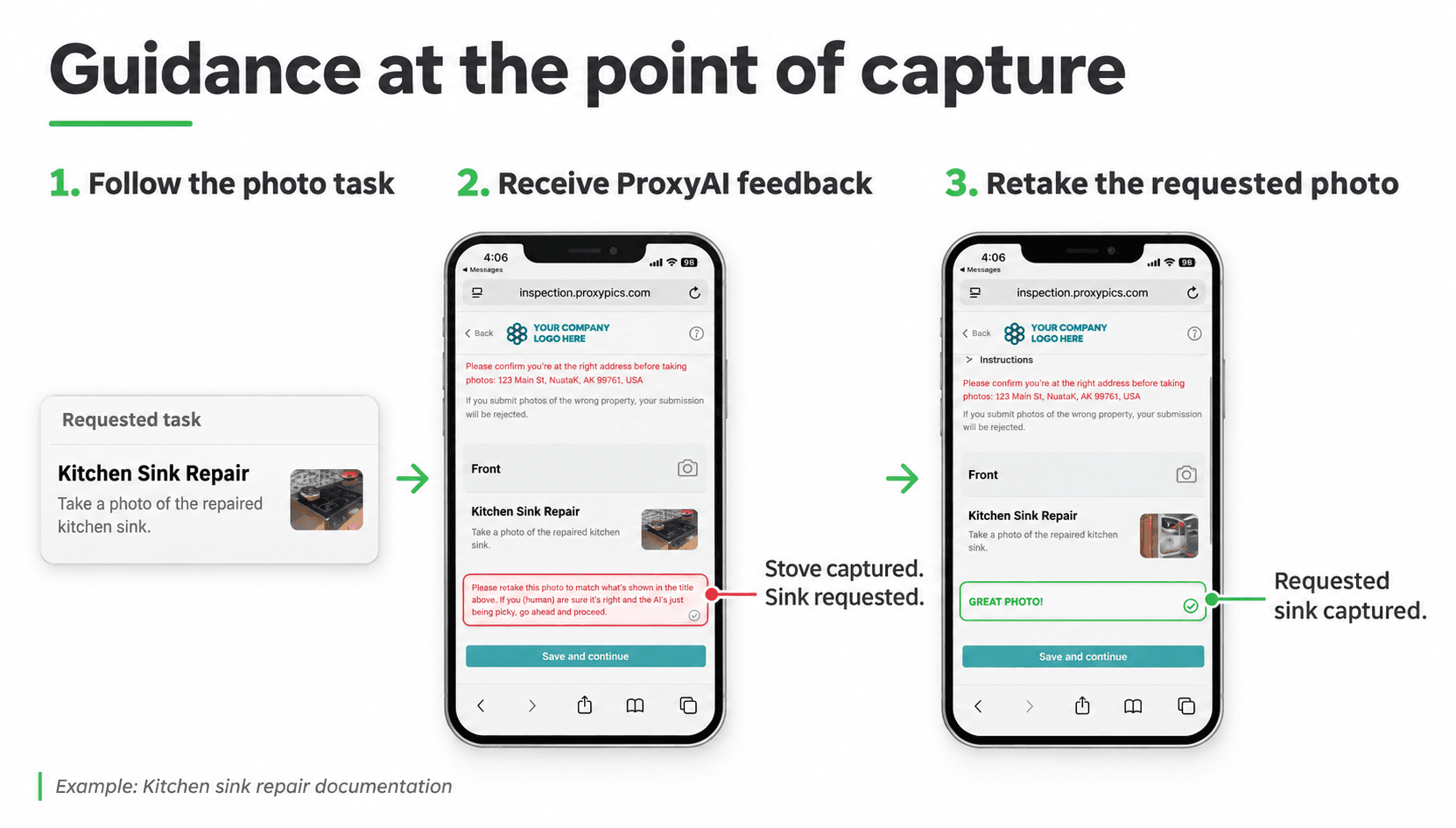
ProxyAI supports that process during capture. If a photo is blurry or does not match the requested task, the homeowner receives a prompt to correct it while they are still at the property.
That timing matters. Addressing a capture issue immediately helps reduce the need for a processor to contact the borrower later and explain what must be resubmitted.
Make participation easier without losing control of the request
Borrower participation works best when the next step is clear.
The homeowner receives an invitation to complete the requested documentation. The scope is already defined, so they can move through the required tasks instead of deciding what information might be relevant.
For eligible assignments, completing the request from home can also avoid the coordination involved in scheduling a separate visit. Borrowers can fit capture around their availability, while lending teams spend less time managing appointment logistics.
The lender still controls what is requested. Borrower convenience supports a more consistent collection process rather than changing the documentation requirements.
Flexible options for different property documentation scopes
Some requests need a straightforward photo-and-question workflow. Others call for a more detailed record of the property’s interior layout or dimensions.
ProxyPics offers browser-based and native app options so the capture experience can match the assignment.
White Label Direct provides a branded browser experience with your company’s logo and colors. The homeowner opens a link and follows the requested tasks without downloading an app.
Native App Direct supports additional capture tools, including View360, floor plan scanning, and 3D model measurements on compatible devices. These tools can add spatial context when the assignment requires more than individual photos.
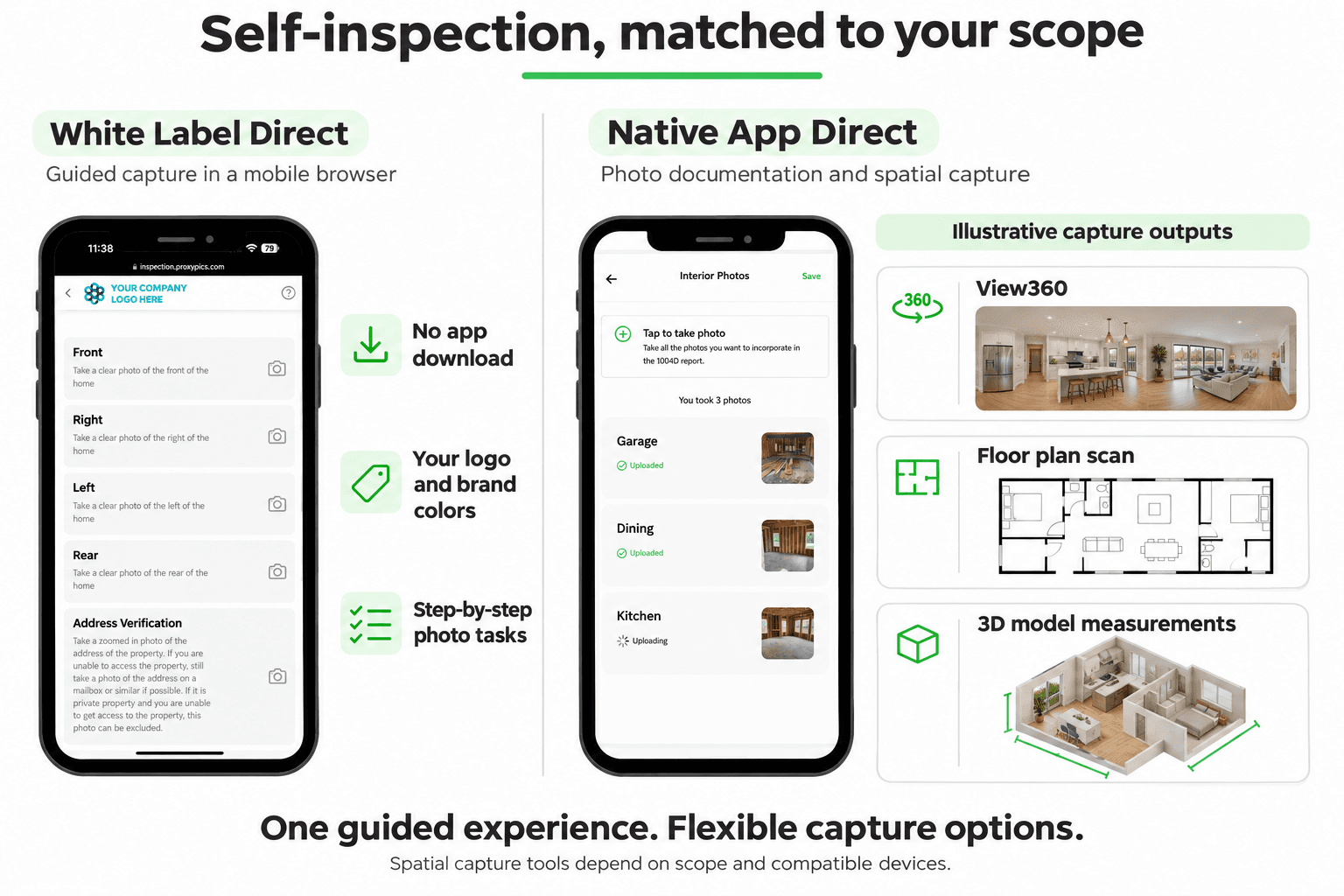
The choice starts with the information the reviewer needs. A focused photo request can use a simple browser workflow. A scope requiring room layout, broader interior views, or measurements can use the native app’s additional tools.
Where borrower self-inspection fits into lending
The value comes from applying the technology to a defined documentation need. Three relevant applications are property condition reports for home equity lending, repair attestations, and post-disaster property documentation.
Property condition reports for home equity lending
When a home equity file requires current property information, a guided request can collect the specified exterior elevations, interior room photos, and condition responses.
The lender defines the scope before the borrower begins. That helps create a consistent collection process across files, while still allowing the request to reflect the property and review requirements.
Repair attestations
When borrower-provided documentation is permitted, a self-inspection can guide the homeowner through photos of completed repairs and related attestation questions.
The request can identify the repair being documented and ask for both context and detail. For example, documentation of repaired drywall can include a view of the room and a closer image of the repaired area. That gives the reviewer a clearer basis for matching the submission to the condition in the file.
Post-disaster property documentation
Following a disaster, lending teams may need updated information about a property’s visible condition.
A guided request can collect designated exterior and interior views, responses about observed damage, and additional photos of affected areas. The scope can be tailored to the information needed for the lender’s review, with capture limited to areas the homeowner can safely access.
These workflows support documentation collection. Whether borrower capture is appropriate depends on the assignment and applicable lender and investor requirements.
Confidence starts with where and when the information was captured
Making capture easy is only part of the process. Lending teams also need a record of the collection event.
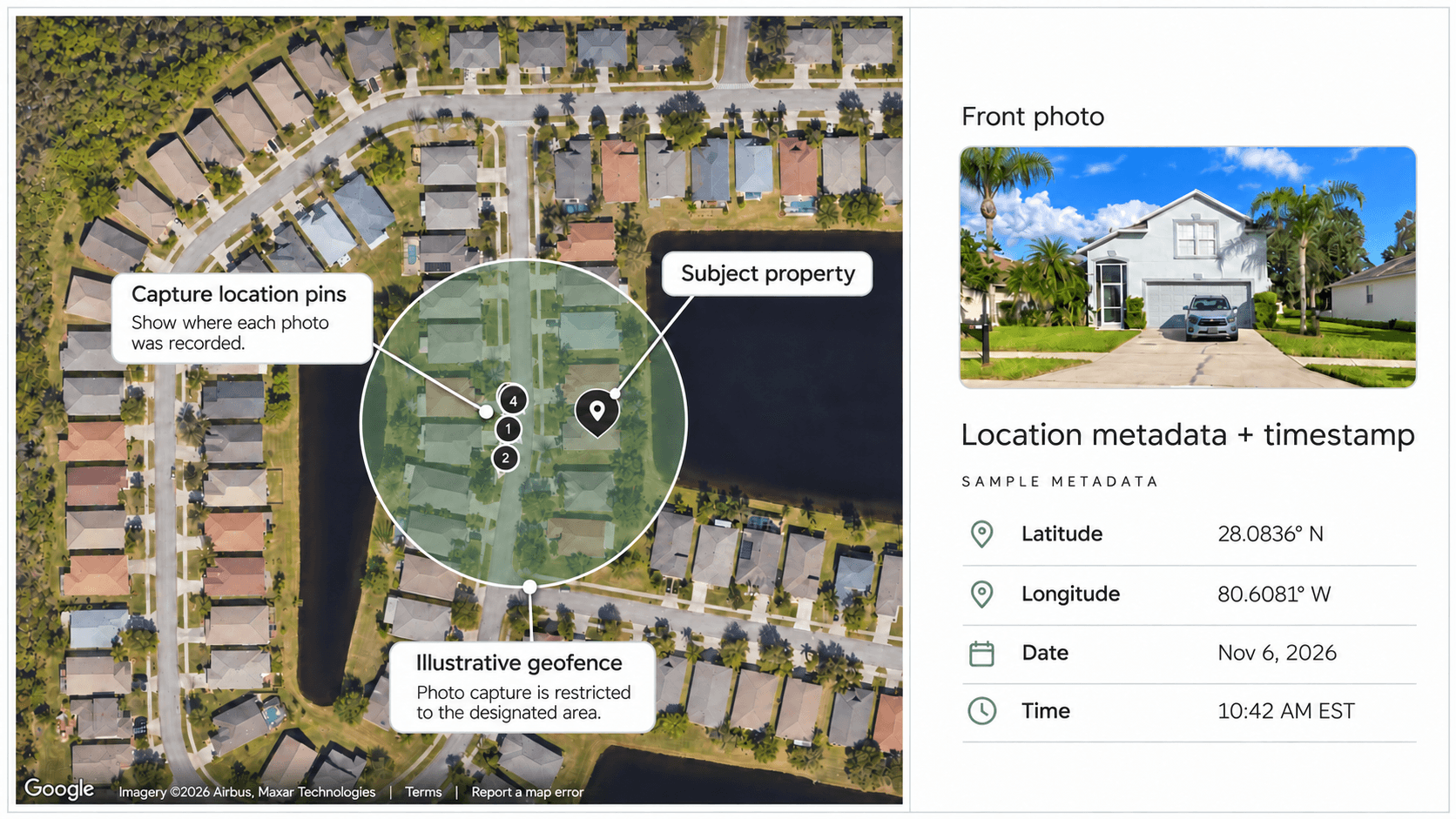
Together, these controls help reviewers assess the source and usability of borrower-provided documentation. They also connect the photos to the property request, rather than leaving the team to interpret disconnected image attachments.
From borrower capture to a report the lender can review
The collection process should produce something useful for the person reviewing the file.
ProxyPics organizes the requested photos and responses into a report, with capture information supporting the review. Depending on the selected scope, the deliverable can also include additional property capture outputs such as View360, floor plans, or 3D model measurements.
For the reviewer, the report should make it easier to connect the original request with the submitted documentation: which area was photographed, what the homeowner reported, and where and when capture occurred.
For the processor, it provides a structured deliverable to move into the next stage of the workflow. The lender retains the decision about whether the evidence satisfies the outstanding requirements or whether further review is needed.
A practical application of technology in the loan process
Borrower self-inspection brings several capabilities into one collection process: configurable scopes, guided mobile tasks, AI-assisted corrections, location controls, and organized reporting.
For lenders, the opportunity is to reduce the coordination required to obtain usable property documentation. For homeowners, it is a clearer way to complete the request using a device they already have.
The technology does its most useful work at the point where confusion usually begins: turning a lender’s documentation requirements into actions a homeowner can understand and complete.
See self-inspection technology in your lending workflow
Bring us a property documentation requirement. We’ll show you how ProxyPics turns it into a guided borrower experience, from the first capture instruction to the report your team reviews.
Request a demo to explore customized scopes, your company’s branded browser experience, and native app options for more detailed capture. Try the process on your own phone and see how it could work for your next eligible assignment.
Explore Self-Inspection Technology